
For most freelance beauty pros, the answer is simple: use a client tracker when the problem is client memory. Use salon software when the problem is salon operations.
Quick rule:
- Client notes, formulas, photos, deposits, balances, and follow-up details: client tracker.
- Online booking, POS, staff calendars, payroll, inventory, rooms, and reporting: salon software.
- Booking app already works but client history is scattered: use both.
Quick Answer
| Your setup | Better fit | Why |
|---|---|---|
| You work alone, book through DMs or WhatsApp, and need client notes, photos, formulas, deposits, and balances in one place | Client tracker | Your daily work is client memory, not salon operations. |
| You run a salon with staff, rooms, resources, inventory, online booking, POS, payroll, and reporting | Salon software | You need operational software for a bigger business structure. |
| You already use a booking app but still lose product notes, photos, and payment details | Both can work | Keep booking in one tool and use a tracker for client history. |
| You are mobile, bridal, booth-renting, suite-renting, or freelance | Usually client tracker first | Your client record needs to follow you, not stay tied to a salon front desk. |
This is not about one category being good and the other being bad.
It is about fit.
What Salon Software Is Built For
Salon software is built to manage operations.
That usually means booking, calendars, payments, staff, inventory, marketing, and reports. Those are useful features if you run a salon or a bigger beauty business.
For example, Vagaro’s pricing support page says pricing can include a base subscription plus optional premium features, and that plans scale by employees and bookable calendars. Fresha’s pricing page lists calendar and appointment scheduling, point of sale, client management, consultation forms, retail and inventory, marketing tools, team management, marketplace fees, and payment processing. GlossGenius pricing includes booking websites, notifications, marketing, inventory, and higher-tier features like forms, time tracking, and room or resource management.
That tells you what the category is designed to solve.
| Salon software feature | Why a salon uses it | Freelancer question |
|---|---|---|
| Online booking page | Clients can book themselves without messaging the owner | Do your clients actually book that way, or do they message you directly? |
| POS and payment processing | Staff can check clients out, take cards, sell retail, and track transactions | Do you need built-in card processing, or do you already use cash, transfer, Revolut, PayPal, or another method? |
| Staff calendars | Multiple employees need schedules, rooms, shifts, breaks, and permissions | Are there multiple people to manage, or just you? |
| Inventory and retail | A salon tracks product stock, backbar, and retail sales | Do you sell retail stock, or mostly carry a personal kit? |
| Marketing and marketplace | The platform helps attract, remind, and rebook clients | Do you need a marketplace, or do most clients come from referrals, Instagram, weddings, or repeat work? |
| Reports and payroll | Owners need payroll, commissions, performance reports, and taxes | Are you managing a team, or just trying to know what each client paid? |
If several of those features are important to you, salon software may be the right tool.
If most of them sound like someone else’s business, paying for the full platform can feel heavy.
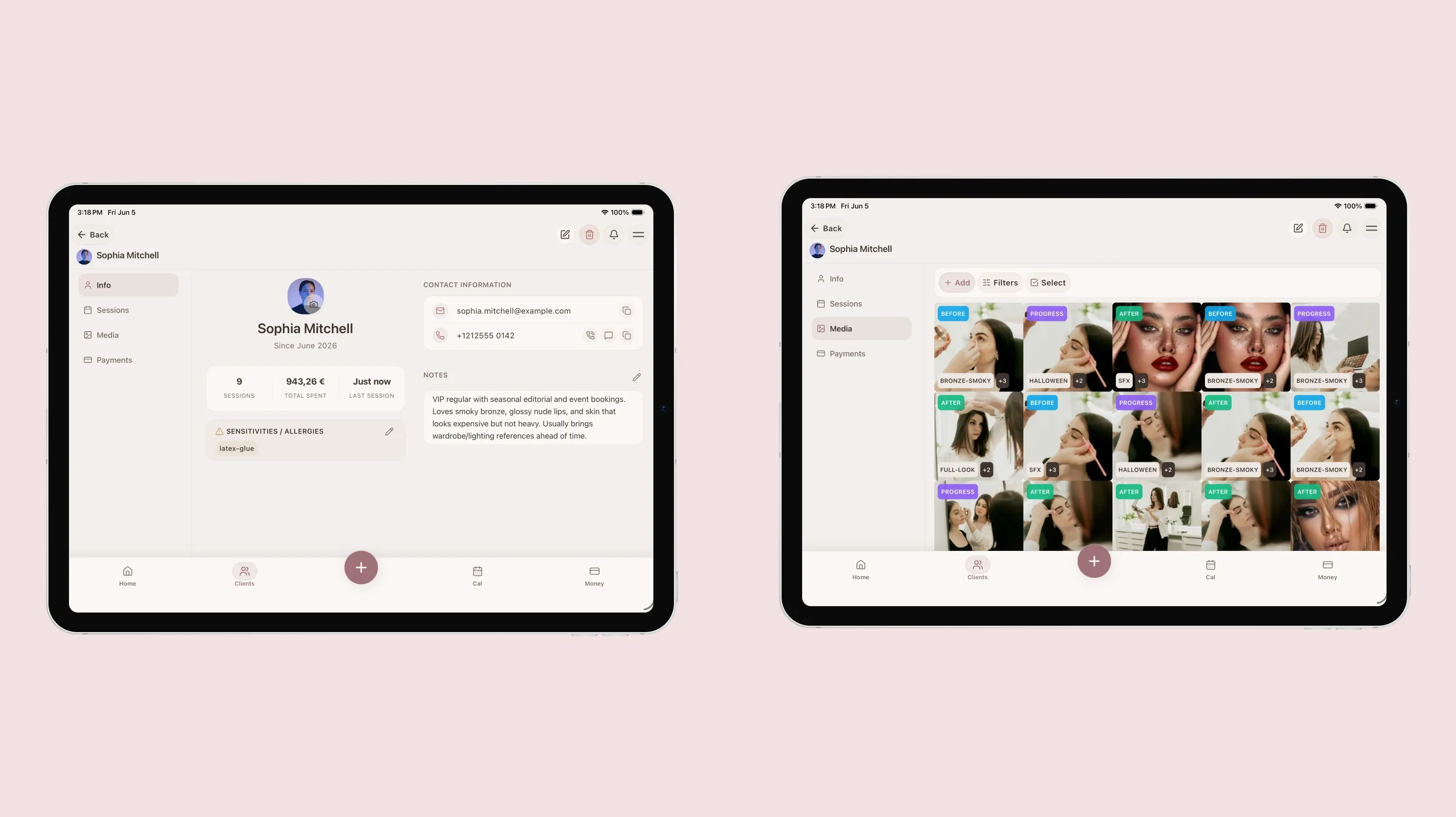
A freelancer usually needs client history first: photos, notes, products, payments, and what to repeat next time.
What a Client Tracker Is Built For
A client tracker is built around the person sitting in your chair.
Instead of starting with a booking slot, it starts with the client profile.
For a freelance beauty pro, that usually means:
- Contact details and preferred way to message
- Allergies, sensitivities, preferences, and products to avoid
- Session history for each appointment
- Photos attached to the right client and service
- Product notes, formulas, lash maps, brow maps, or skin notes
- Deposits, balances, tips, and payment status
- Notes for what to repeat or change next time
That is the part many freelancers actually need every week.
Client management, session tracking, photo tagging, and payment tracking matter because repeat clients do not ask, “Which booking platform did you use?”
They ask:
- Can you recreate the look from last time?
- Which foundation shade did you use?
- Did I pay the deposit already?
- Can you avoid the product that irritated my skin?
- Can you do the same lash map, but a little softer?
- Do you still have the photo from my trial?
A client tracker helps you answer those questions without digging through DMs, screenshots, spreadsheets, and your camera roll.
Pricing Models Are Different
Prices and features change often, and many pages localize by country. The examples below were checked on June 11, 2026 from official public pricing pages.
The important thing is not only the starting price.
It is the cost model.
| Tool | Public pricing signal checked | Cost model to notice |
|---|---|---|
| Vagaro | US base subscription listed at $23.99/month for a limited time, with additional employee calendars and premium add-ons on the official support page | Base subscription plus possible employee calendars, payment processing, and add-ons |
| Fresha | Pricing page lists an Independent plan, per-team-member Team pricing, marketplace fees for new Fresha marketplace clients, payment processing, and optional add-ons | Subscription plus marketplace/payment/add-on logic depending on use |
| GlossGenius | Standard plan shown at $28 monthly or $24/month billed annually; Gold and Platinum plans add higher-tier features | Booking, payments, marketing, and salon tools bundled by tier |
| Square Appointments | Pricing page shows $0, $49, and $149 per location tiers, plus processing fees for different payment types | Location-based plans plus payment processing fees |
| Booksy | Booksy Biz page shows $29.99/month plus $20 per additional user, with payment processing and hardware not included | Booking platform subscription plus team/payment considerations |
| StyleSeat | Pricing page shows a $35/month Premium plan and lists calendar, payments, notes, photo history, marketplace discovery, reminders, and marketing | Flat monthly subscription built around booking, payments, and growth tools |
| Mangomint | Pricing page starts at $165/month for 2 to 10 service providers and includes salon features like scheduling, client management, online booking, retail, staff management, POS, and reporting | Team and location-oriented salon operations pricing |
A client tracker should have a different cost model because it is doing a different job.
For example, Glamorph pricing is EUR 9.99/month, excluding VAT, because Glamorph does not try to be a public booking marketplace, POS processor, payroll system, or salon inventory platform. It is focused on client profiles, sessions, photos, notes, payments, and history for solo beauty pros.
That does not automatically make it the right tool for everyone.
It makes it the right tool when client memory is the problem you are actually trying to solve.
When Salon Software Makes Sense
Choose salon software when your business needs operational structure.
You probably need salon software if:
- Clients need to book themselves online
- You process card payments through the platform
- You sell retail products and need inventory
- You manage more than one bookable calendar
- You assign clients to staff members
- You need payroll, commissions, or time tracking
- You manage rooms, chairs, or equipment
- You need automated marketing campaigns
- You want marketplace discovery from the platform
In that situation, a client tracker alone is not enough.
You need the booking, payment, team, and reporting layer.
When a Client Tracker Makes More Sense
Choose a client tracker when your biggest problem is remembering the work.
You probably need a client tracker if:
- You work alone or mostly alone
- You book through Instagram, WhatsApp, text, email, or referrals
- You care more about repeat-client notes than public online booking
- You need before and after photos attached to each client
- You track formulas, lash maps, skin notes, brow maps, or product reactions
- You accept deposits and balances outside a salon POS
- You travel to clients, weddings, shoots, hotels, or homes
- You want your client history to stay with you if you change studio, salon, or city
This is common for makeup artists, bridal MUAs, hairstylists, lash artists, nail techs, brow artists, estheticians, mobile beauty pros, and booth or suite renters.
For those workflows, offline access can also matter. A bridal venue, home visit, hotel room, or outdoor shoot is not always a place where you want your client notes depending on perfect signal.
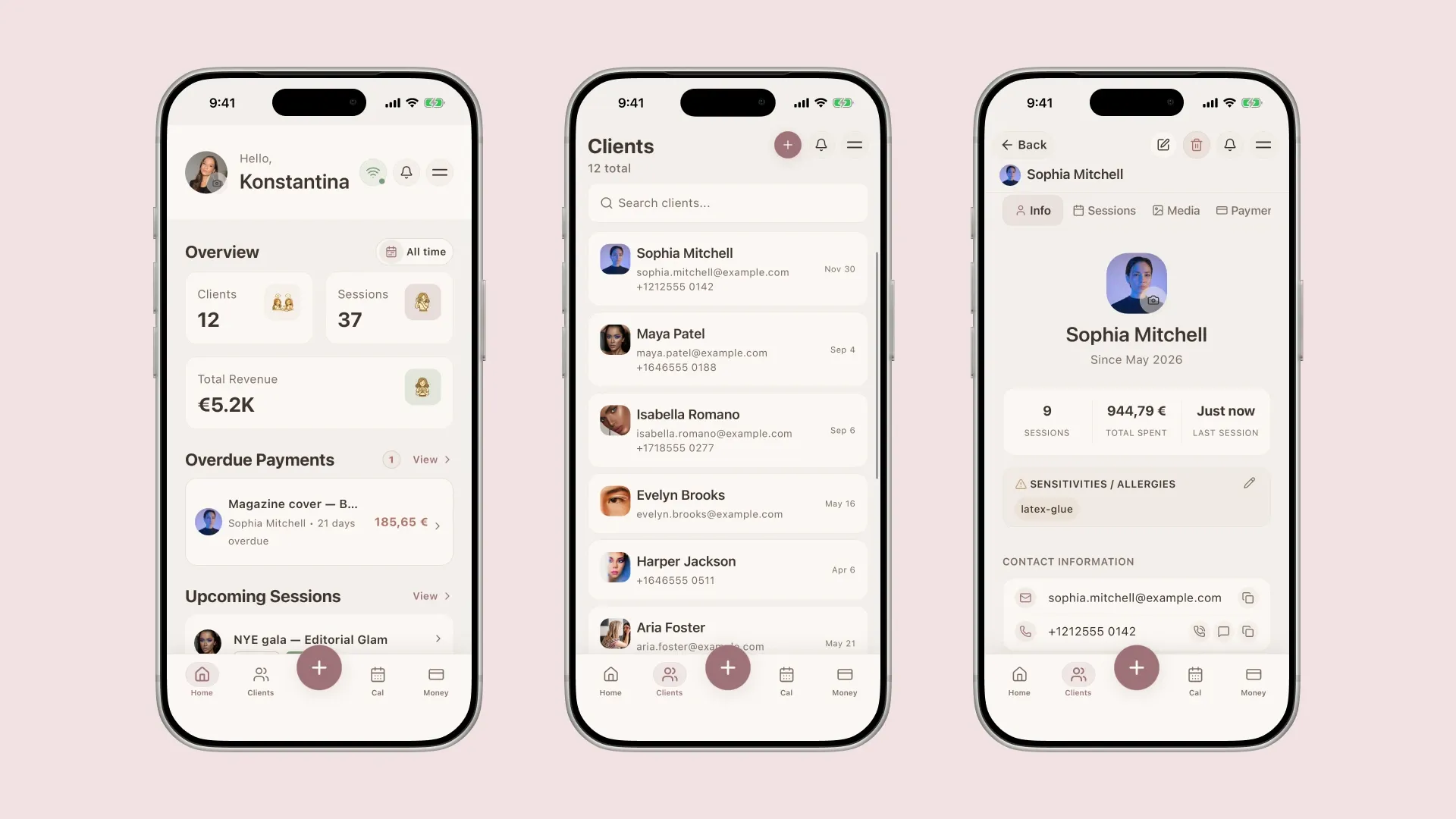
The best system is the one you can actually check before the appointment and update after the service.
The Best Setup May Be Two Simple Tools
Some freelancers do not need salon software at all.
Others use one booking or payment tool and one client tracker.
That can be a very clean setup.
| Workflow | Tool 1 | Tool 2 |
|---|---|---|
| You book by DM and take bank transfers | Calendar or messages | Client tracker |
| You use a booking app for appointments | Booking app | Client tracker for notes, photos, and payments |
| You rent a chair in a salon with its own booking system | Salon’s booking system | Personal client tracker you control |
| You run a multi-staff salon | Salon software | Optional separate client tracker only if individual artists need deeper personal records |
The goal is not to collect apps.
The goal is to stop forcing one tool to do a job it was not made for.
How to Decide in 10 Minutes
Use this quick audit before paying for anything.
- List your last 20 appointments.
- Mark how each client booked: DM, WhatsApp, phone, booking page, salon front desk, referral, marketplace.
- Mark how each client paid: cash, transfer, card, app, salon POS, deposit, balance later.
- Write what you needed to remember for each client: formula, skin note, lash map, photo, allergy, preference, balance, follow-up.
- Circle the problems that repeated most.
Then choose based on the pattern.
| If the repeated problem is… | You likely need… |
|---|---|
| Clients cannot book easily | Booking software |
| Payments are messy at checkout | POS or payment software |
| Staff calendars are hard to manage | Salon software |
| Product notes, photos, and preferences are scattered | Client tracker |
| You cannot find past client photos | Client tracker with photo tagging |
| You forget deposits or balances | Client tracker with payment notes |
| You need new clients from a marketplace | Marketplace or booking platform |
| You need your client history to move with you | Personal client tracker |
This keeps the decision practical.
You are not choosing based on the longest feature list.
You are choosing based on the problem that costs you time, trust, or money.
A Simple Migration Plan
If you decide a client tracker is the better fit, do not try to move your entire history in one night.
Start with the clients most likely to book again.
- Add your 20 most recent or most important clients.
- Save contact details and usual service.
- Add allergy, sensitivity, formula, product, or preference notes you already know.
- Attach the best 3 to 5 useful photos for each client.
- Add the current payment status if there is a deposit, balance, or unpaid amount.
- After every new appointment, add one session note before the day ends.
That is enough to feel the difference.
Your system does not need to be perfect.
It needs to be easy enough that you actually keep using it.
Final Checklist
Choose salon software if you need:
- Public online booking
- POS and card processing
- Staff calendars
- Inventory
- Payroll or commissions
- Room or resource management
- Marketplace discovery
- Salon-level reporting
Choose a client tracker if you need:
- Client profiles
- Session history
- Photos by client
- Formulas, lash maps, brow maps, or skin notes
- Allergy and sensitivity notes
- Deposit and balance tracking
- A personal client book you control
- A simpler system for freelance work
For many solo beauty pros, the answer is not “more software.”
It is the right layer: a clear client tracker for the client memory that makes your work feel professional, personal, and easy to repeat.
Written by

Professional makeup artist, bridal MUA, and founder of Glamorph
Professional makeup artist and bridal MUA with 5+ years of experience, founder of Glamorph, writing about bridal beauty, soft glam, and freelance beauty work.
You might also like

Best Client App for Freelance Nail Techs
Nail techs track gel systems, allergy flags, fill schedules, and nail art across dozens of clients. A client tracker replaces notes and spreadsheets.
Read more
How to Organize Makeup Clients Without Expensive Salon Software
A practical client organization system for freelance makeup artists to track notes, photos, products, payments, and repeat booking details.
Read more
How to Price Hair Color Services as a Solo Stylist in 2026
Price hair color services with time, product cost, toner, corrections, and client history, using practical formulas and service examples.
Read more